New
Use the left and right arrow keys to move between preview images.
Spreadsheet · Digital download
Small Business Annual Budget and Forecast
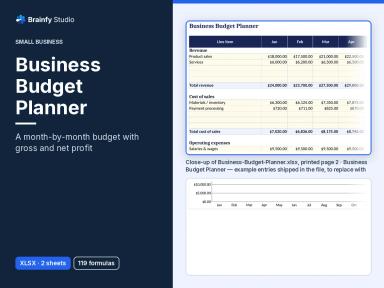
12-month small business budget in Excel format: seasonal spread, fixed months, actuals, variance flags, a rolling run-rate forecast, monthly P&L and a dashboard.
PDFXLSX4 files547 KB
- Instant digital download — nothing is shipped.
- Secure checkout by Stripe.
- Version 1.0.0 · updated Nov 9, 2026.
Description
Most small businesses either have no budget or a spreadsheet that stops being useful in February. This workbook keeps working all year: plan once, then enter actuals each month and it tells you where you're off and where the year is heading.
Enter an annual amount for each income, cost-of-sales and overhead line (up to 40) and pick how it spreads: evenly or by one of three seasonality profiles you can edit. Fix known months, such as an annual insurance premium in January, and the rest spreads over the open months automatically. Each month, type the actuals from your bookkeeping. The Variance sheet compares year-to-date actual with budget per line, marks it favourable or unfavourable and flags lines past your threshold. The Forecast sheet keeps a rolling full-year view: actuals for closed months, and budget or run-rate (budget × year-to-date actual ÷ budget) for the rest. A Monthly P&L shows budget, actual and forecast side by side, the Annual Summary gives quarterly totals with a planning tax set-aside, and the Dashboard shows the headline numbers with two charts.
Included: worked-example and blank workbooks (10 sheets, 2,503 formulas; the example is a fictional coffee roaster with 20 lines and actuals to September), plus a 5-page PDF guide in US Letter and A4 with a quick start, how the spread and forecast work, a worked example and a budgeting checklist. Google Sheets copy: pending.
General information, not tax, accounting or financial advice.
Who it's for: Owners and managers of small businesses: shops, cafés, makers, studios, trades and service firms planning a 12-month budget..
Included files
- small-business-annual-budget-and-forecast-v1.0.0-all-files.zipAll files in one ZIP (includes licence)ZIP
- Annual-Budget-and-Forecast-Example.xlsxWorkbook with a fictional coffee roaster's 2027 budget and actuals to September: 10 sheets, 2,503 formulasXLSX
- Annual-Budget-and-Forecast-Blank.xlsxBlank workbook with starter budget lines, ready for your numbersXLSX
- Annual-Budget-and-Forecast-Guide-Letter.pdfPDF guide: quick start, how the spread and forecast work, worked example, budgeting checklist (US Letter, 5 pages)PDF
- Annual-Budget-and-Forecast-Guide-A4.pdfPDF guide (A4, 5 pages)PDF
- LICENCE.txtLicence summaryTXT
- Plus a single ZIP with every file and the licence (392 KB).
How to use
Open the blank .xlsx and read Start Here. Set the plan year and profiles on Settings, enter annual budgets on Budget Inputs, then each month enter actuals and move 'Last closed month' forward. Read Variance and the Dashboard.
Customer reviews
No reviews yet. Reviews can only be written by customers who own this product.
Frequently asked questions
Is this a physical product?
No. This is a digital download. Nothing is shipped — you download the files from your account after purchase.
How do I get my files?
After payment, go to My Downloads in your account. Your purchase stays available there to re-download.
What can I do with it?
Use for yourself, your household or your own business. Print unlimited copies for that use. No reselling or sharing the files.
What's the difference between the budget and the forecast?
The budget is your plan and stays fixed. The forecast updates every month: actuals so far plus budget or run-rate for the months left.
Can I fix certain months?
Yes. Type an amount in that month's column on Budget Inputs. The rest of the annual amount spreads over the other months by the profile weights.
Is the tax set-aside my tax bill?
No. It's a savings estimate at the rate you choose on each profitable quarter's profit. Ask a tax professional what to set aside.
Which apps has it been tested in?
LibreOffice Calc (recalculated and checked against expected values). Not tested in Excel, Google Sheets or Numbers.
You may also like
- New
- New
- New
- New
- New