




New
Use the left and right arrow keys to move between preview images.
Student Loan Payoff Planner
By Brainfy Studio
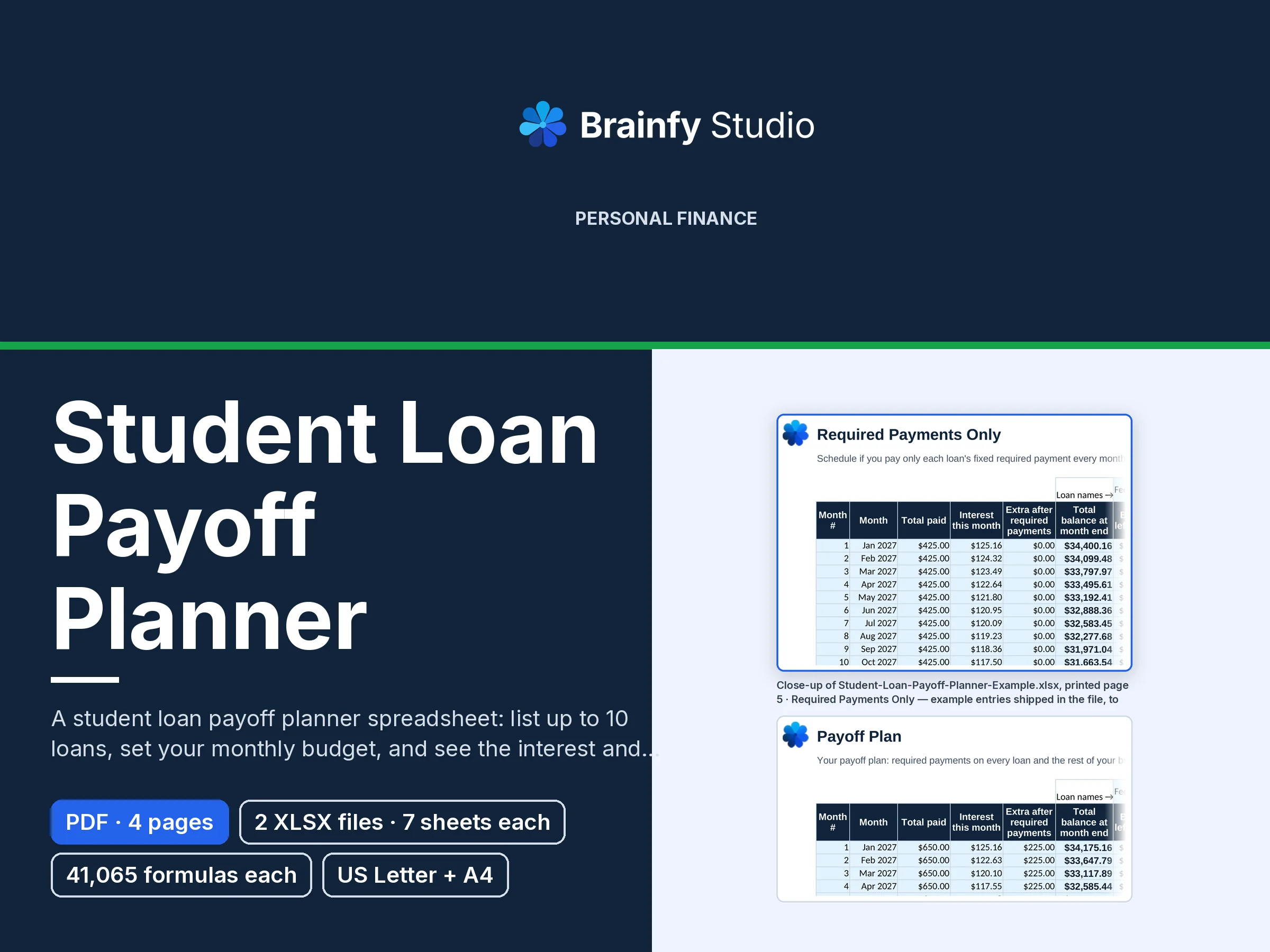
A student loan payoff planner spreadsheet: list up to 10 loans, set your monthly budget, and see the interest and months you save versus paying only the required payments, with a month-by-month plan and a tracker for your real payments.
XLSXPDF4 files1.1 MB
Opens in any PDF reader and spreadsheet apps that open .xlsx. Details
See all 8 preview imagesPrice $12.99
- Instant digital download — nothing is shipped.
- Version 1.0.0 · files released Nov 23, 2026. Page updated Nov 23, 2026.
Look inside
Real pages, rendered from the files you download. Select a page to enlarge it.
- XLSX
- 4 pages
- 7 sheets
- US Letter + A4
- Worked example + blank copy
Spreadsheet tabs
At a glance
With several student loans at different rates, it's hard to see when you'll be debt-free, how much interest an extra payment saves, or whether you are keeping up with your plan.
- Yes, the PDF pages print at home on US Letter or A4 (both included).
- Edit
- Yes: the spreadsheet (.xlsx): formulas calculate as you type.
- Sheets
- 7
Not included
- Anything physical: this is a digital download and nothing is shipped.
- A tested Google Sheets version (the .xlsx is tested in LibreOffice Calc only).
- Rights to resell or share the files (Standard licence).
Description
For graduates, students and parents in Canada and the United States repaying student loans (government loans, private loans or a student line of credit) who want to see what paying more than the required payment really saves, and want a simple way to track each month against a plan.
List up to 10 loans with balance, yearly interest rate and required monthly payment (0% works for interest-free loans), your monthly loan budget and a payoff method (avalanche: highest rate first, or snowball: smallest balance first). The workbook checks that each payment covers its interest and builds two schedules for up to 30 years: paying only the required payments, and your payoff plan, where every loan gets its required payment and the extra goes to one loan at a time, with each paid-off loan's payment rolling on to the next.
The Dashboard shows the interest saved versus paying only the required payments, how many months sooner you are debt-free, your debt-free month and date, total interest and total paid for each, the first loan paid off, and three charts (total balance by month, interest by loan, payoff month by loan).
The Tracker has 60 months: type what you actually paid and your loan balance, and it shows the planned payment and balance next to them, with ahead or behind.
Included: a worked example (a fictional graduate with 4 loans, including a 0% loan, with month 1 checked by hand in the guide) and a blank copy (7 tabs, 41,065 formulas), plus a 4-page PDF guide in US Letter and A4 with a monthly check-in list and Google Sheets import notes. Instant digital download; nothing is shipped.
Interest is an estimate (yearly rate ÷ 12 on each month's balance) and required payments are held at today's amount; lender figures will differ. It does not include repayment assistance, forgiveness, income-based plans or tax rules, and it does not move money or contact lenders. General information, not financial advice.
Written and illustrated by Brainfy Studio, created with AI assistance.
What's included
- Worked-example and blank workbooks (.xlsx, 7 tabs)
- Loans: up to 10 loans with payoff order and payoff month
- Required Payments Only and Payoff Plan schedules: 360 months each
- Tracker: 60 months of actual vs planned payments and balances
- Dashboard with interest saved, months sooner and 3 charts
- 4-page PDF guide in US Letter and A4 with Google Sheets notes
- Licence summary
Who it's for: Graduates, students and parents in Canada and the United States repaying student loans..
Included files
- student-loan-payoff-planner-v1.0.0-all-files.zipAll files in one ZIP (includes licence)ZIP
- Student-Loan-Payoff-Planner-Example.xlsxWorkbook with a fictional graduate's 4 loans, both schedules and a 3-month tracker log filled in: 7 tabs, 41,065 formulasXLSX
- Student-Loan-Payoff-Planner-Blank.xlsxBlank workbook, ready for your own loansXLSX
- Student-Loan-Payoff-Planner-Guide-Letter.pdfPDF guide: quick start, how the numbers work, worked example checked by hand, monthly check-in, Google Sheets notes (US Letter, 4 pages)PDF
- Student-Loan-Payoff-Planner-Guide-A4.pdfPDF guide (A4, 4 pages)PDF
- LICENCE.txtLicence summaryTXT
How to use
Open the blank .xlsx and read Start Here. Fill in Inputs and your loans, check the interest saved on the Dashboard, follow the Payoff Plan and log each month on the Tracker.
Customer reviews
No reviews yet. Only verified owners can review. How reviews work
Frequently asked questions
Is this a physical product?
No. This is a digital download. Nothing is shipped — you download the files from your account after purchase.
How do I get my files?
After payment, go to My library in your account. Your purchase stays available there to re-download.
What can I do with it?
Use for yourself, your household or your own business. Print unlimited copies for that use. No reselling or sharing the files.
How is the interest saved worked out?
It's the total interest if you pay only each loan's required payment, minus the total interest on your payoff plan, both estimated month by month.
How is interest calculated?
As an estimate: each month's balance × yearly rate ÷ 12, rounded to the cent. Lenders may use daily interest or variable rates, so balances will differ a little.
Can I add an interest-free loan?
Yes. Type 0% as the rate. It gets no interest, and with the avalanche method it is paid off last.
Does it include repayment assistance or forgiveness?
No. Those rules depend on where you live and your situation, so check with your lender or loan servicer.
Is there a Google Sheets version?
The guide explains how to open the .xlsx in Google Sheets. It has not been tested there, so check the formulas after converting.
Which apps has it been tested in?
LibreOffice Calc: formulas recalculated and checked against expected values.
You may also like
- New
- New
- New
Personal Finance
Included with membership
Holiday Returns, Refunds and Gift Card Tracker
XLSXPrice $5.99USD - New
- Free