Home Inventory Spreadsheet, a Room by Room Setup
By the Brainfy Studio editorial team · Published
Start a home inventory with one room and one row per item. Record what it is, where it is kept and how you can identify it. Add purchase records and photo references as you find them. A small inventory you maintain is more useful than a long list with missing or outdated information.
Choose the record you need
Separate an inventory of belongings from a shopping list. An inventory describes items you own. A shopping list records things you plan to buy. Give each belonging a stable ID, such as LR-001 for a living room lamp, so moving it to a different room does not break its receipt or photo reference.
Useful fields include item name, room, quantity, purchase date, purchase cost, model, serial number and receipt location. Mark unknown dates as unknown rather than guessing. Keep one currency per total. Purchase cost is a historical record, not a current valuation or a statement of insurance coverage.
Work through one room before adding another
Choose a manageable starting point, such as a desk or cupboard. Record a short description that distinguishes similar items. Two identical chairs can share a row with quantity two. Two computers with different serial numbers should have separate rows. Be consistent about this choice before calculating totals.
Take photos that show the item and its identifying details. Use the same ID in the file name, for example LR-001-photo.jpg. A receipt reference can be a folder path or document name. Test that another household member can find the record without relying on your memory.
Keep evidence separate from the spreadsheet
Store original receipts and photos in an organized folder. The spreadsheet can point to that folder without containing every image. Avoid putting door codes, passwords or identity document numbers in item descriptions. Limit access to people who need the inventory and keep a backup outside the device holding your working copy.
Review the list after a move, a major purchase or disposal. Change an item status when you sell or give it away instead of silently deleting its history. Put a review date on the list so an old record is easy to spot.
Choose a file or a plain list
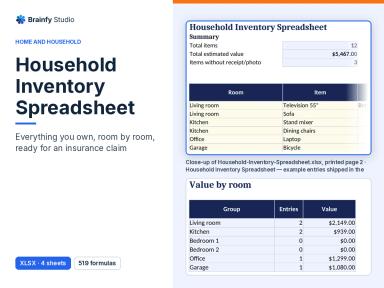
You can start the layout in any blank spreadsheet. Brainfy Studio also sells the Household Inventory Spreadsheet as an XLSX file with Start Here, Inventory, Lists and By Room sheets. The instructions here are free to read. The downloadable workbook is paid. Do not assume it includes automatic photo capture or an insurance valuation service.
Worked example, a home office inventory
These fictional purchase costs illustrate quantity handling. They are not replacement prices.
| Item ID | Quantity and unit cost | Recorded purchase total |
|---|---|---|
| OF-001 desk | 1 × $240 | $240.00 |
| OF-002 chair | 2 × $95 | $190.00 |
| OF-003 monitor | 1 × $180 | $180.00 |
| Room total | 4 items | $610.00 |
The two chairs share one row because they have the same recorded unit cost. If their identifying details differ, split them into separate rows while keeping the total at $610.00.
Before you finish
- Use stable item IDs.
- Separate individual items when their identifying details differ.
- Label the currency and cost basis.
- Open a sample receipt and photo reference.
- Record the last review date and back up the files.
Brainfy files for this task
Checked against the files customers download. Prices are current catalogue prices.
Household Inventory Spreadsheet (Paid — $14.00)
XLSX · 1 file · sheets: Start Here, Inventory, Lists, By Room
A paid XLSX workbook for recording household items. Use the Inventory sheet for item records and the By Room sheet for room summaries. Keep receipt and photo files in your own controlled folders.
Questions
Is the inventory spreadsheet free?
No. This setup guide is free to read. The Household Inventory Spreadsheet is a paid XLSX download. You can also create the example layout yourself in a blank spreadsheet.
Does the total show my insurance payout?
No. The example adds recorded purchase costs only. It does not determine current value, coverage or a claim outcome.
How often should I update the list?
Update it when belongings change and choose a recurring review date that fits your household. A room by room check can make the review easier to finish.
Sources and method
The workflow and fictional example are original Brainfy Studio editorial examples. File names, formats and sheet names were checked against the published-product snapshot dated 8 November 2026. The linked source is a related resource, not an endorsement of this product.
- Home Inventory List Template — Vertex42