Skip to content

Brainfy Studio Academy

Build spreadsheets you can use at work.

Short, practical lessons that end with a file you keep. Start with a free exercise: turn five items into a job quote with line totals, a markup you can check and a printable page.

Teach with Brainfy Studio

The free exercise needs no account. The workshop is coming soon: no date, instructor or registration yet.

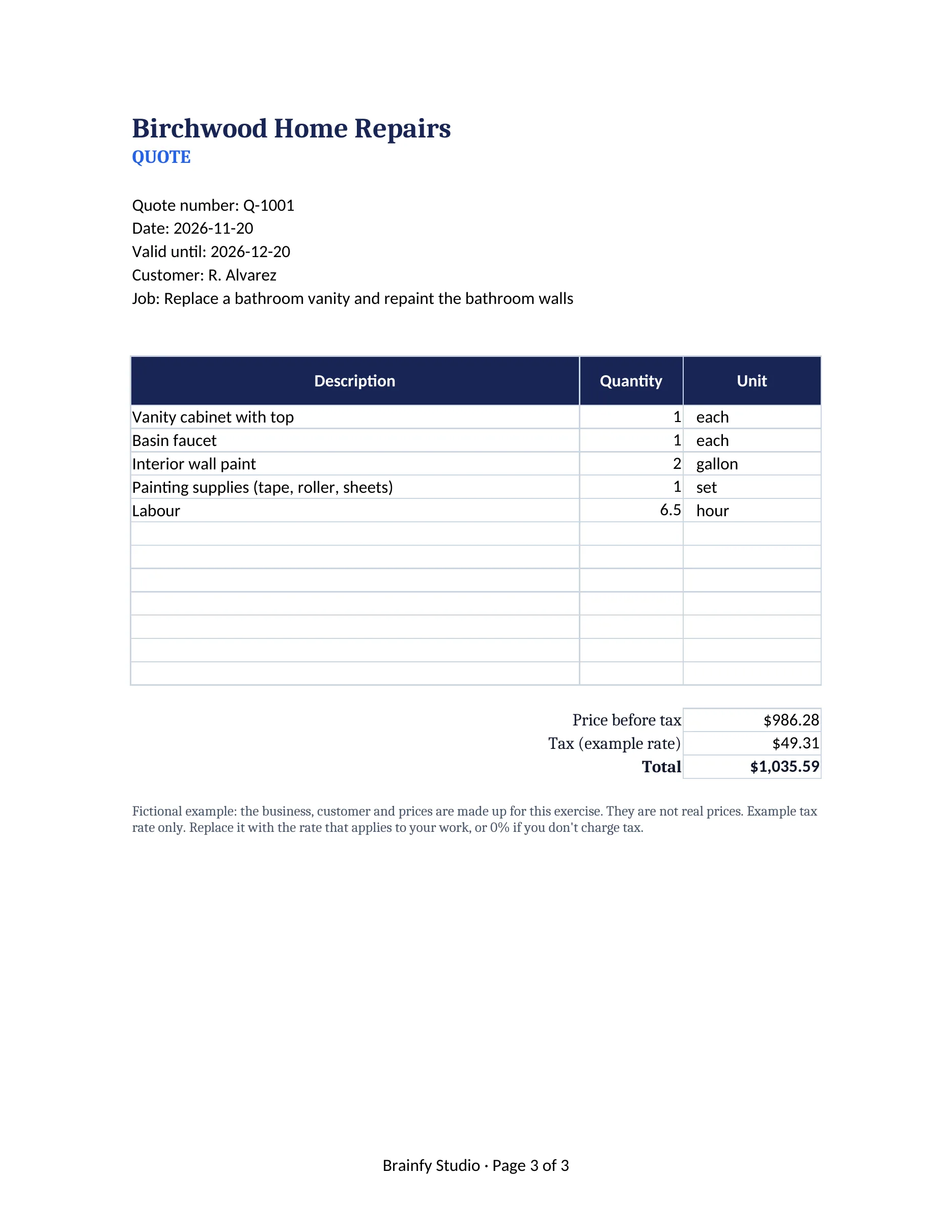
Printable quote from the solution workbook: Birchwood Home Repairs (fictional), five items, price before tax $986.28, example tax $49.31, total $1,035.59.
The finished quote from the exercise’s solution workbook, rendered from the real file. Fictional business and prices.

Sample lesson · Step 3 of 5

Calculate line totals you can trust

From the planned workshop, Build a Job Quote in Excel. About five minutes.

  1. Each row of a quote is one item: a quantity, the unit you price it in and a unit cost.
  2. The line total is quantity × unit cost. Round it to the cent so the printed lines add up to the printed subtotal: =ROUND(C12*E12,2).
  3. Copy the formula down every item row, including the empty ones, so a new item is counted the moment you type it.
  4. Add the rounded lines for the subtotal: =ROUND(SUM(F12:F23),2). A blank row adds nothing; a quantity of 0 adds $0.00.
  5. Check one line by hand. If 6.5 hours × $55.00 isn’t $357.50 in your sheet, look at the cell references before anything else.

Next in the workshop: apply a defined markup, check it, and see why a 20% markup is a 16.7% margin.

Practise it in the free exercise
Worked rows from the exercise (fictional prices)
ItemQtyUnit costLine total
Basin faucet1$74.50$74.50
Interior wall paint2$38.75$77.50
Labour6.5$55.00$357.50
Close-up of the Quote tab in the solution workbook: items with quantity, unit cost and line totals, then subtotal, markup, tax and quote total.

The Quote tab of the solution workbook. Workbooks tested in LibreOffice Calc 24.2.7.2. Excel for Microsoft 365 testing pending.

First workshop

Format: Live workshopComing soon

Build a Job Quote in Excel

75 minutes: 60 minutes of teaching and 15 minutes of questions and answers. For solo service businesses, small contractors and adult beginners. Instructor and date to be announced.

Hear when the first course opens

Sent by Brainfy AI Inc., 20542 69A Ave, Langley, BC V2Y 0W4, Canada · support@brainfystudio.com · www.brainfystudio.com. Privacy policy.

You’ll join the Brainfy Studio email list, where we plan to announce the first course. Nothing to buy.

Also in progress: Construction Estimating Basics, a written pilot that stays in review until a qualified estimator has checked it.

Why learn with Brainfy Academy

What you’ll get in each course

Lessons are built around tasks you finish, not videos you watch. Each course is planned to include three things you keep.

  • Practical outcomes. Every lesson ends with something you can use on real work.
  • Honest instruction. Who teaches, their qualifications, the course scope and its limits will be stated plainly.
  • A clear format. Every course shows its format: live workshop, self paced or written course. The first workshop is planned as a live session; the other formats are still to be confirmed.

Included in each course

  • Worked example

    A fictional floor replacement

    Room
    3.0 m × 2.4 m
    Floor area
    7.2 m²
    Material price
    Supplier quote

    From the pilot draft: scope, quantity, rates, price, review, handoff.

  • Practice workbook

    Exercises with an answer key

    A fictional room measures 4.0 m × 3.2 m. What is the area, and what five things must you confirm before a real estimate?

  • Checklist

    Review before you send

    • Scope and revision
    • Units and quantities
    • Labour assumptions
    • Inclusions and exclusions

Courses that connect to products you can see today

Real pages from published Brainfy Studio products. They’re sold separately and optional; course materials aren’t final.

Planned certificate design

Earn a certificate for the work you complete.

Finish the required lessons and practical assignment in an eligible course. Download your certificate and share a verification link.

Sample. Not an issued credential.

Sample. Not an issued credential.

Brainfy Studio Academy

Certificate of Completion

This certifies that

Sample Learner

Build a Job Quote in Excel

Completed the required lessons and practical assignment.

  • Calculate rounded line totals and a subtotal
  • Apply a defined markup and tell it apart from margin
  • Export a printable one-page quote as a PDF

Instructor (to be confirmed)

Academy representative

Completion date:
Date of completion
Certificate ID:
SAMPLE-0000
Verify at:
Verification address

QR code
(sample)

Issued by Brainfy AI Inc. Confirms course completion. Does not confer professional accreditation or a licence to practise.
Sample. Not an issued credential. A planned design with placeholder details. Certificates aren’t being issued yet.

Requirements for Build a Job Quote in Excel

Proposed — final rubric approved by the instructor

  1. Complete all 5 required lessons
  2. Score at least 80% on the short knowledge check (retries allowed, with feedback)
  3. Pass the practical task: build and export a job quote from a new set of items

The practical task checks:

  • Line totals: quantity × unit cost on every item row
  • Rounding: each line and the markup rounded to the cent, and the subtotal adds the rounded lines
  • Markup: the defined markup applied on cost, giving the price before tax
  • Markup and margin: the margin is worked out and explained as different from the markup
  • Exported quote: a one-page printable quote saved as a PDF

Proposed pass mark: 80% on the knowledge check, with retries and feedback. Attending the live session alone would earn an attendance certificate only. The skills self-check on the Academy page is a recommendation tool and doesn’t count.

The nine catalogue courses below will list their own requirements once their lessons are written. Until then, none of them offers a certificate.

Course catalogue

Nine planned courses in three tracks

None of these is open yet. We’ll finish and review the materials before any course opens.

Learning paths

Follow a path from first steps to confident work

What you’ll master

Skills the planned courses cover

  • Spreadsheet structure

    Inputs, calculations and results kept apart so a workbook stays readable. (Business and Finance track)

  • Everyday formulas

    Totals, percentages and lookups for business numbers. (Business and Finance track)

  • Shared sheets

    Sharing, protecting and organising sheets a team edits together. (Business and Finance track)

  • Cash-flow forecasting

    Opening balance plus receipts minus payments, week by week. (Business and Finance track)

  • Scope review

    Inclusions, exclusions, assumptions and open questions before pricing. (Construction Skills track)

  • Quantity takeoffs

    Measured quantities with their source, unit and waste allowance. (Construction Skills track)

  • Cost lines and markup

    Direct cost, overhead, contingency and markup, kept visible. (Construction Skills track)

  • Job costing

    Carrying the approved estimate into actual costs and margin. (Construction Skills track)

  • Checking your work

    A review checklist before anything goes to a customer. (Construction Skills track)

  • Product planning

    Choosing a problem to solve and the files that solve it. (Digital Creator track)

  • Packaging templates

    Checking, documenting and preparing files buyers can open. (Digital Creator track)

  • Pinterest promotion

    Pins and boards that lead to a product page. (Digital Creator track)

Skills self-check

How do your skills stack up?

See whether to start as a beginner, intermediate or advanced learner, which path suits you, and a free guide to begin with.

This is a recommendation tool. It runs in your browser, stores nothing, and doesn’t count toward a certificate.

Seven questions, about two minutes. No account needed. Your answers stay in this browser tab: nothing is saved or sent.

1. Which area do you most want to learn?
2. How do you use spreadsheet formulas today?
3. When you price or plan a piece of work, do you write down your assumptions?
4. Have you built a budget or forecast and compared it with what actually happened?
5. Could you explain the difference between markup and margin?
6. Have you made a template, checklist or form that someone else used?
7. How do you check your work before you share it?

Questions

Honest answers

Courses are still being written. Here’s what is and isn’t decided.

When do courses launch?

We’ll announce dates when the first course is ready. The first pilot, a written Construction Estimating Basics mini-course, is a draft that still needs review by a qualified estimator.

How much will they cost?

Pricing hasn’t been set yet. Nothing on this page can be bought, and nobody will be asked for payment details while courses are in development.

Will there be certificates?

Certificates are planned, but none is issued yet. This is the proposed policy, and it may change before the Academy opens:

  • Eligible courses: each course page will say whether it offers a certificate. The first is planned for the Build a Job Quote in Excel workshop.
  • Requirements: finish the required lessons, pass a short knowledge check (proposed pass mark 80%, with retries and feedback) and a practical task checked against a rubric the instructor approves. Attending a live session alone would earn an attendance certificate only.
  • Download and sharing: a PDF and a sharing image in a My Certificates area of your account, with a verification link. Showing your name publicly would be your choice.
  • Keeping it: the certificate would be included in the course price, and an earned certificate stays valid without a membership.

A certificate confirms course completion. It isn’t a professional accreditation or a licence to practise. The skills self-check on this page doesn’t count toward one.

How do I hear first?

Sign up with the email form on this page and confirm your address. You’ll join the Brainfy Studio email list, and we plan to announce the first course there. You can unsubscribe at any time. You can also follow the project in the community.

Can I learn something now?

Yes. The free guides cover the same ground as the planned courses, and these free tools work in your browser with no account:

Brainfy Academy

Build skills that make your work easier

Leave your email and we’ll let you know when the first course is ready. Until then, the free guides and tools are open to everyone.

Get course news by email

Sent by Brainfy AI Inc., 20542 69A Ave, Langley, BC V2Y 0W4, Canada · support@brainfystudio.com · www.brainfystudio.com. Privacy policy.

You’ll join the Brainfy Studio email list, where we plan to announce the first course. Nothing to buy.

Three learning paths

  • Business and Finance

    Excel Fundamentals for Business · Google Sheets for Small Business · Build Your First Cash Flow Dashboard

  • Construction Skills

    Construction Estimating from Start to Finish · Material Takeoffs and Quantity Basics · Job Costing for Contractors

  • Digital Creator

    Create Your First Digital Product · Prepare Templates for Sale · Pinterest Marketing for Digital Products